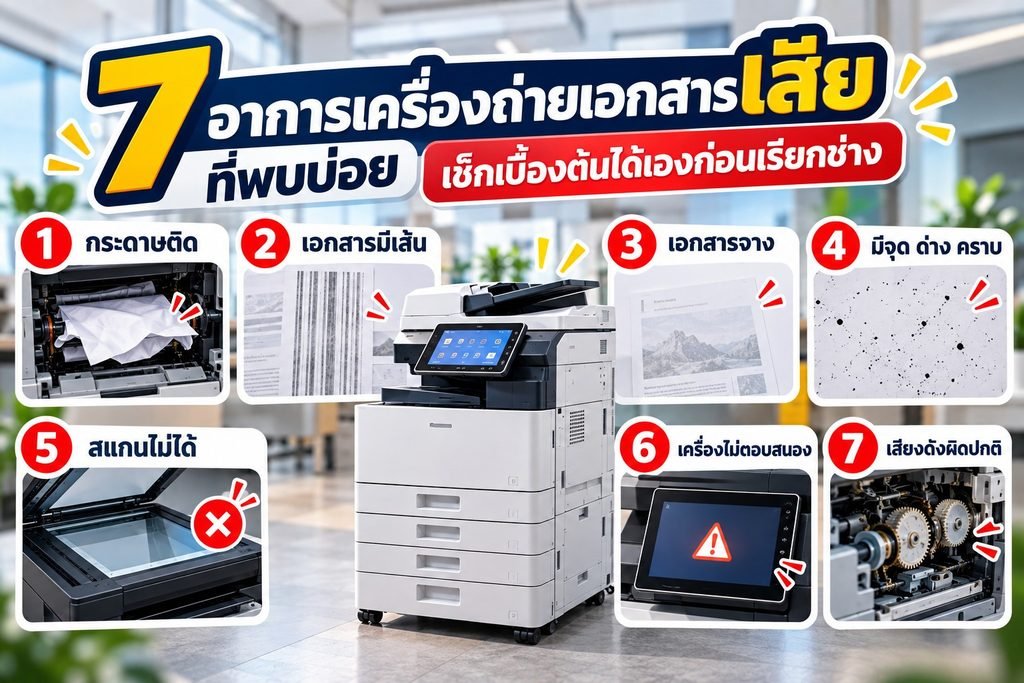
A well-maintained copier breaks down less, produces sharper prints and lasts longer. Many problems that require a technician are caused by everyday usage habits that are easy to fix. Here’s how to look after your copier so it lasts longer and costs less to repair
1. Place the machine in the right location
- Set it on a flat, stable surface that doesn’t wobble.
- Leave space around the machine for ventilation – don’t push it too close to the wall.
- Avoid direct sunlight, dusty areas and spots where air-conditioning blows directly onto it.
- Plug it directly into a grounded outlet; don’t share a power strip with high-power appliances.
2. Watch out for humidity, especially in the rainy season
Humidity is a major cause of paper jams and blurry prints, especially near the sea or during the rainy season.
- Keep paper in its original wrapping, sealed, on a shelf raised off the floor.
- Don’t leave too much paper loaded in the trays during humid weather.
- If the room is very humid, consider using a dehumidifier or running the air-conditioning.
3. Use the right type of paper
- Use paper of a weight and size supported by the machine.
- Set the paper type on the machine to match the paper you actually use.
- Fan the paper to separate the sheets before loading the tray.
- Don’t use paper that is wrinkled, folded, or has staples, clips or tape on it.
4. Clean regularly
- Wipe the scanner glass and the document feeder glass strip with a soft, lint-free cloth once a week.
- Wipe the underside of the document cover that touches your originals.
- Wipe the exterior and the screen – never spray cleaner directly onto the machine.
- Never place drinks or liquids on the machine.
5. Use quality consumables and parts
Low-grade toner or parts may seem cheaper at first, but if they cause toner scatter, scratch the drum or wear out the fuser early, the repair costs will outweigh the savings. Choose consumables that match your machine model from a reliable supplier.
6. Operate the machine correctly
- Follow the proper shutdown and start-up procedure, and wait for jobs to finish before switching off.
- Don’t pull jammed paper out by force – open the covers indicated on the screen.
- Don’t open covers or remove parts while the machine is running.
- Keep each print job within the machine’s capacity.
7. Schedule regular inspections and maintenance
Regular inspections by a technician (preventive maintenance) help find worn parts before they fail in the middle of work. The technician cleans the inside of the machine, checks the rollers, drum and fuser unit, and adjusts settings so the machine runs at full efficiency.
Copier maintenance checklist
| Frequency | What to do |
|---|---|
| Daily | Check the paper in the trays, clear documents left on the machine, and keep items off the machine |
| Weekly | Wipe the scanner glass and ADF glass strip, and clean the exterior |
| Monthly | Record the page counter, check toner levels and check consumables stock |
| Per technician’s schedule | Internal inspection and maintenance |
Mahachaicopy provides installation, maintenance and after-sales care, with Onsite Service by our technicians and Remote Support for fast initial troubleshooting.
Talk to our team
For questions about copiers, rentals, parts or consumables, contact us via LINE @mhcthailand or call 088-644-4855 (Mon–Sat, 08:30–17:30), or fill in the quotation request form on our website. We serve Bangkok, Samut Sakhon, Samut Songkhram and Nakhon Pathom.
Interested in a machine or service in this article?
Ask about models, prices or rental terms. Our team replies Monday to Saturday.